









Adguard Home去广告
1 序言
事情是这样的,经常被小米腾讯广告骚扰,而且公共 DNS 很容易被污染,所以我就想着弄个 DNS 服务在本地,DNS服务有很多,但是我喜欢 AdGuard Home,以后简称 adg。
2 什么是 Adguard Home
AdGuard Hom 是一款开源的全网广告拦截与反跟踪软件,特别适用于家庭网络环境。它通过 DNS 服务器拦截广告、跟踪器和恶意软件,保护用户的隐私和网络安。

2.1 广告拦
AdGuard Home 能够拦截网站、应用程序和游戏中的广告,保护用户的在线体验不受干。
2.2 隐私保
通过 DNS 层面过滤广告,防止跟踪脚本获取用户的个人信息,保护用户的隐。
2.3 恶意软件防
除了广告和跟踪器,AdGuard Home 还能拦截恶意软件,确保网络环境的安全。
2.4 全局DNS服服
用户可以通过设置网络设备使用 AdGuard Home 的DNS服务,从而保护整个家庭网络的隐私和安全。
2.5 开源特性
AdGuard Home 是开源软件,用户可以根据自己的需求定制规则,实现更精准的拦截。
3 怎么安装 Adguard Home
3.1 OpenWRT 安装 Adguard Home
OpenWRT 要么找有安装好 adg 的固件,如果没有就去下面两个地方下载了手动安装,一个是 arm 一个是 x86。
#x86https://raw.githubusercontent.com/AUK9527/Are-u-ok/main/x86/all/adguardhome.run#armhttps://raw.githubusercontent.com/AUK9527/Are-u-ok/refs/heads/main/apps/all/adguardhome.run上传文件就可以安装了,玩openwrt的人应该都会。
3.2 docker安装 Adguard Home
我更喜欢用这个方法安装,docker 真的很好用。我先把我的 docker 树目录再放出来,方便你修改路径,如果和我一样的路径就不需要修改。
/root根目录├── mnt| ├── docker| ├── apps| ├── Adguard Home| ├── data # 数据存储路径| ├── conf # 配置文件路径| ├── rule # rule文件路径| ├── docker-compose| ├── Adguard Home.yaml首先我们需要获取以下网卡名称,然后在下面yaml文件中换对应的网卡名称,这一步很重要。
其次我们可以设置自己需要的独立 ip,也就是 docker 里面的 macvlan。
# 官方文档# https://hub.docker.com/r/adguard/adguardhome
# 在ssh输入# ip addr# 获取到ip那个就是网卡名称,比如br-lan,enp5s0
# ---
name: adguardhome# 最后编辑时间:2025-08-19services: adguardhome: # 镜像地址 image: adguard/adguardhome:latest # 容器名称 container_name: adguardhome # 主机名 hostname: adguardhome # 路径 volumes: # 数据存储路径 - /mnt/docker/apps/adguardhome/data:/opt/adguardhome/work # 配置文件路径 - /mnt/docker/apps/adguardhome/conf:/opt/adguardhome/conf # rule文件路径 - /mnt/docker/apps/adguardhome/rule:/opt/adguardhome/rule # 网络模式,macvlan独立IP networks: macvlan_net: # 输入独立IP ipv4_address: 192.168.x.x ports: # 需要开放的端口880,881,882,53,853,8853,67,68 # DNS 基础端口(需同时开放 TCP/UDP) - 53:53/tcp # 标准 DNS 协议端口(TCP,用于大型 DNS 响应) - 53:53/udp # 标准 DNS 协议端口(UDP,常规 DNS 请求)
# 加密 DNS 协议端口 - 853:853/tcp # DNS-over-TLS (DoT),加密 DNS 通信 - 853:853/udp # DNS-over-QUIC (DoQ),基于 UDP 的低延迟加密协议 #- 8853:8853/udp # 备用 DoQ 端口(部分客户端兼容性需求)
# 加密 DNS DoH 协议端口 - 443:443/tcp - 443:443/udp
# 重定向 HTTP WebUI 管理端口 - 80:80/tcp # HTTP 管理界面 - 80:80/udp - 3000:3000/tcp # WebUI 控制台端口 - 3000:3000/udp
# 高级功能端口(按需开放) #- 67:67/udp # DHCP 服务端口(若需提供 DHCP 服务) #- 68:68/udp # DHCP 客户端端口 # 重启策略,总是重启 restart: always
# 设置网络,macvlannetworks: macvlan_net: driver: macvlan driver_opts: # 指定物理网络接口,linux请用ip addr查询 parent: enp5s0 ipam: config: # 设置网段/子网掩码 - subnet: 192.168.x.0/243.3 其他安装方法
其他方法略,自我查找。
4 怎么配置 Adguard Home
4.1 非加密上游 DNS 服务器
如图所示,在里面填上DNS。
119.29.29.29223.5.5.5223.6.6.6114.114.114.1148.8.8.88.8.4.44.2.2.24.2.2.11.1.1.1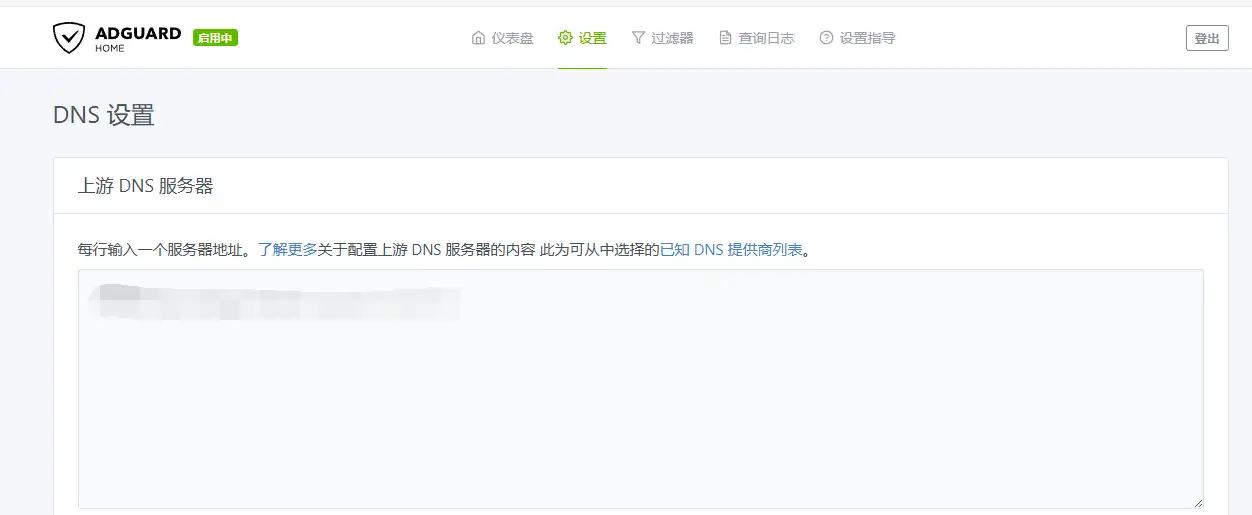
4.2 加密上游 DNS 服务器
首先需要去下面链接下载 dns 分流规则,其次用将这个文件上传到路径为 /mnt/docker/apps/adguardhome/rule 里面。
# dns分流上游规则https://gitee.com/nw177/adg_rule/blob/master/dns-2.0.txt最后在路径为 /mnt/docker/apps/adguardhome/conf/AdGuardHome.yaml 文件中修改这一行。
# 编辑yaml文件nano /mnt/docker/apps/adguardhome/conf/AdGuardHome.yaml# 编辑upstream_dns_file这一行,后面添加文件路径upstream_dns_file: /opt/adguardhome/rule/dns-2.0.txt这样重启 adg 的 docker 我们就修改成功了,上游分流 dns 文件。其实如果你会修改这个 yaml 文件我们直接可以修改这个的。
4.3 DNS 设置
打开并行请求,如图所示。
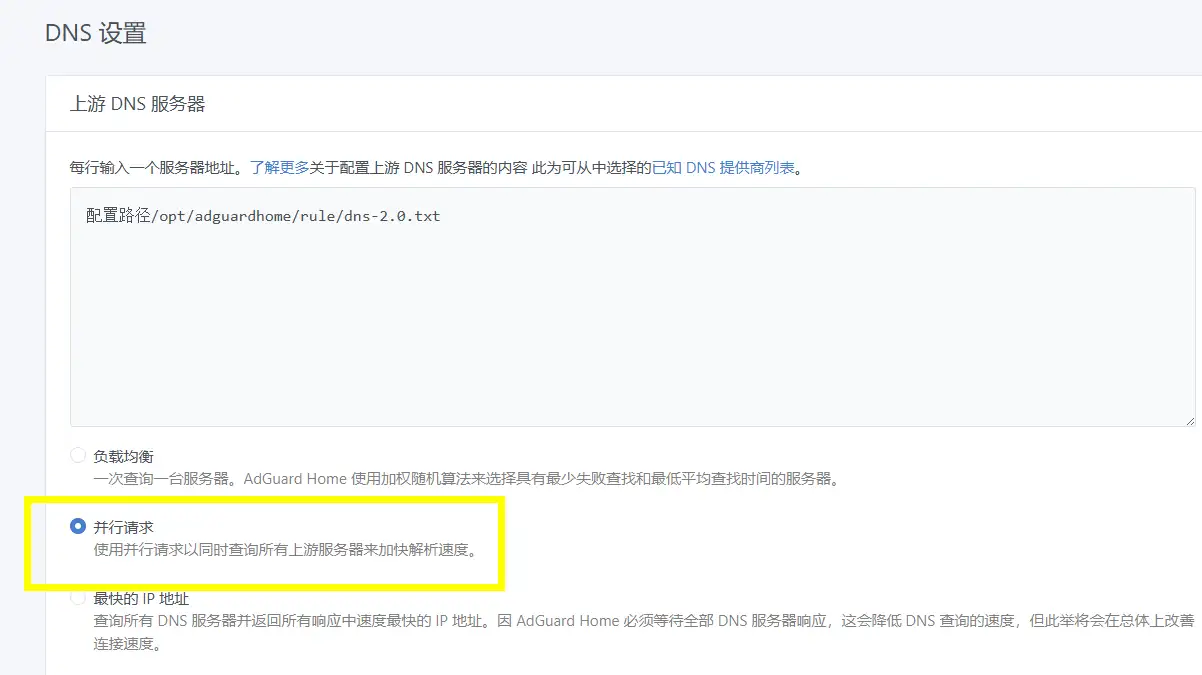
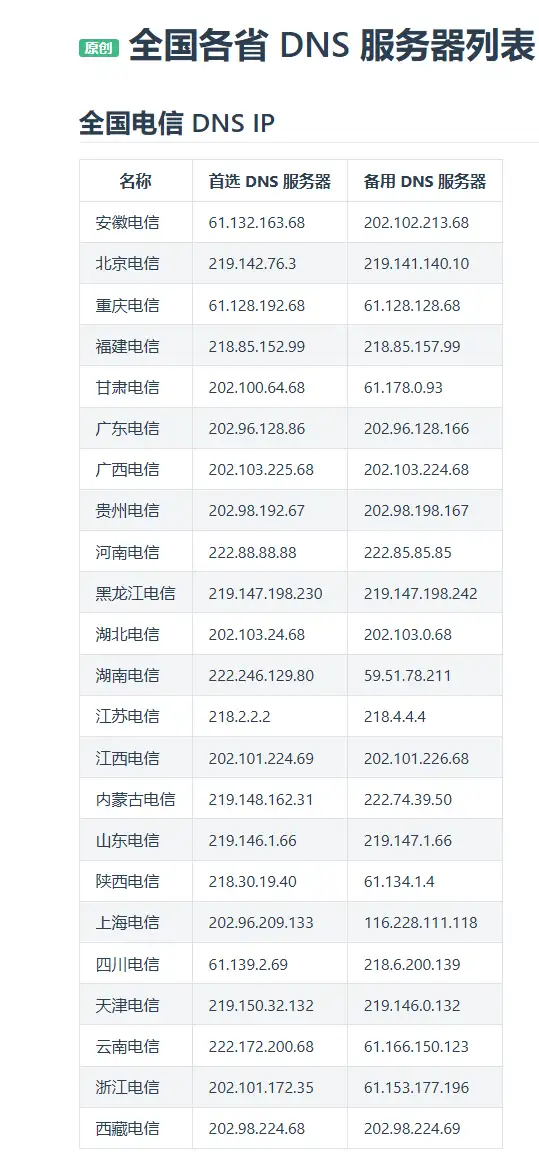

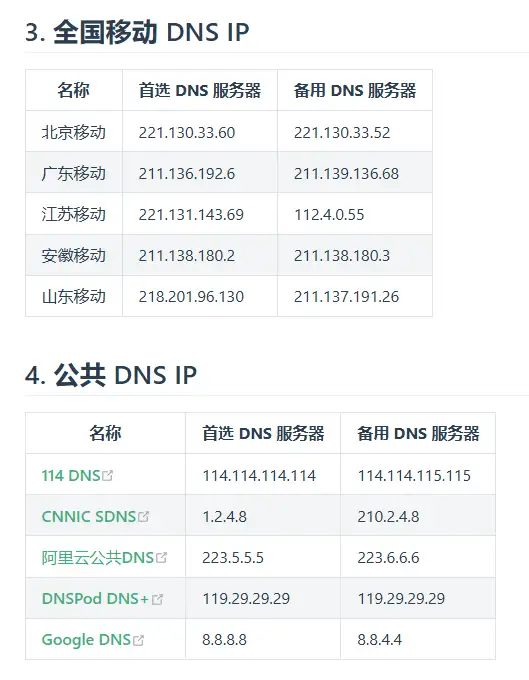
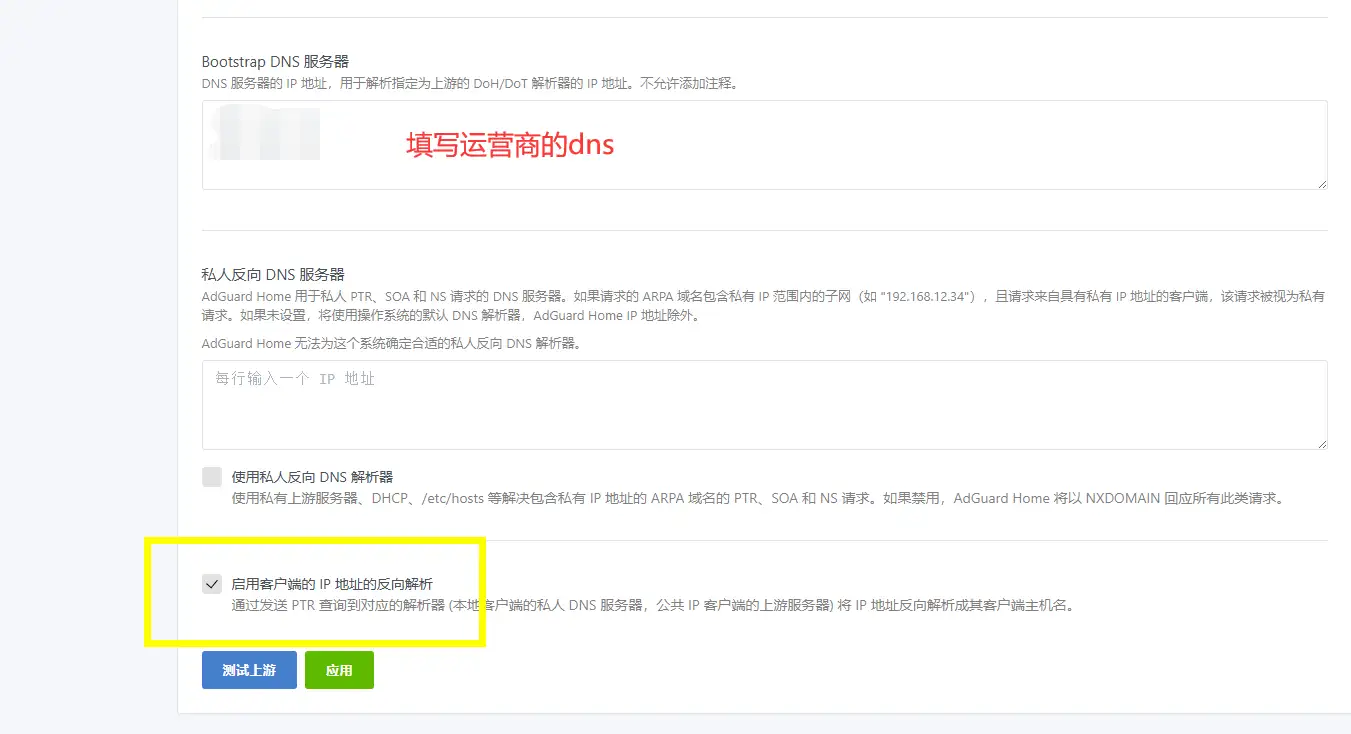
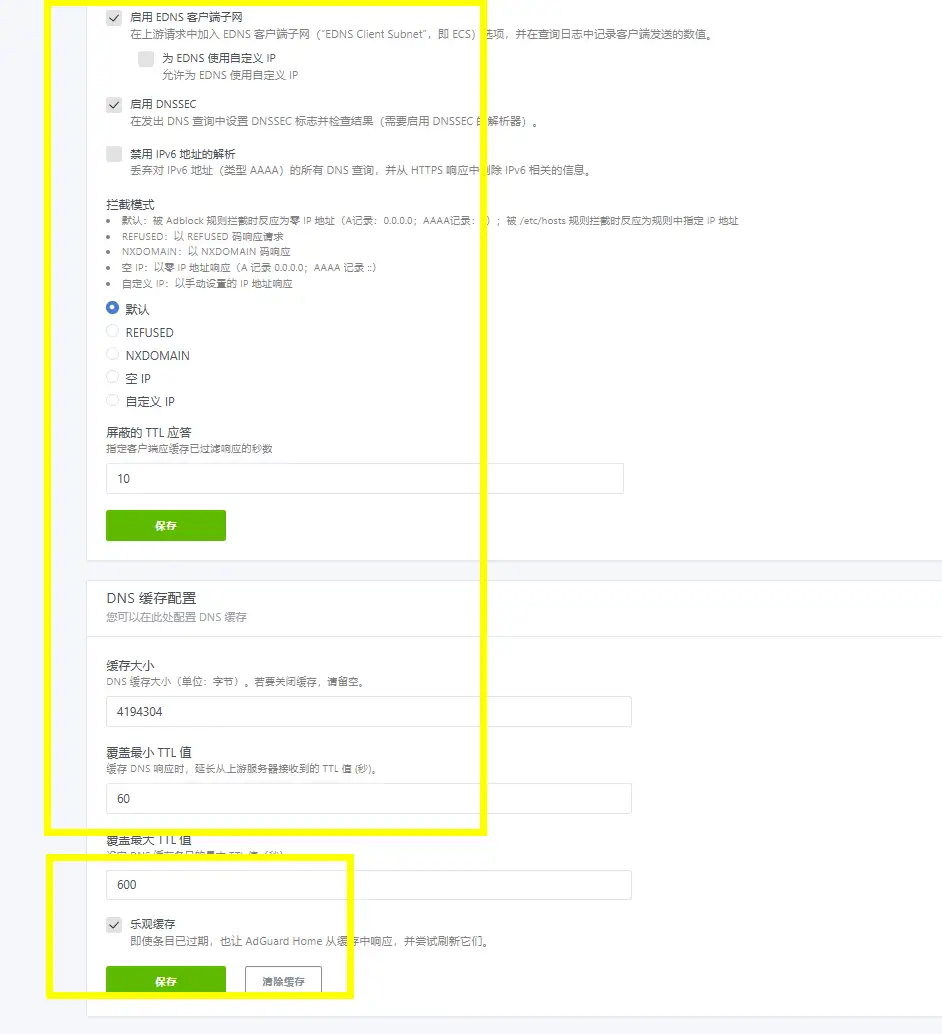
修改黄色框的几个内容,还有填写运营商的 dns。
# 云南电信dns222.172.200.6861.166.150.123
# 云南联通dns221.3.131.11221.3.131.124.4 黑名单设置
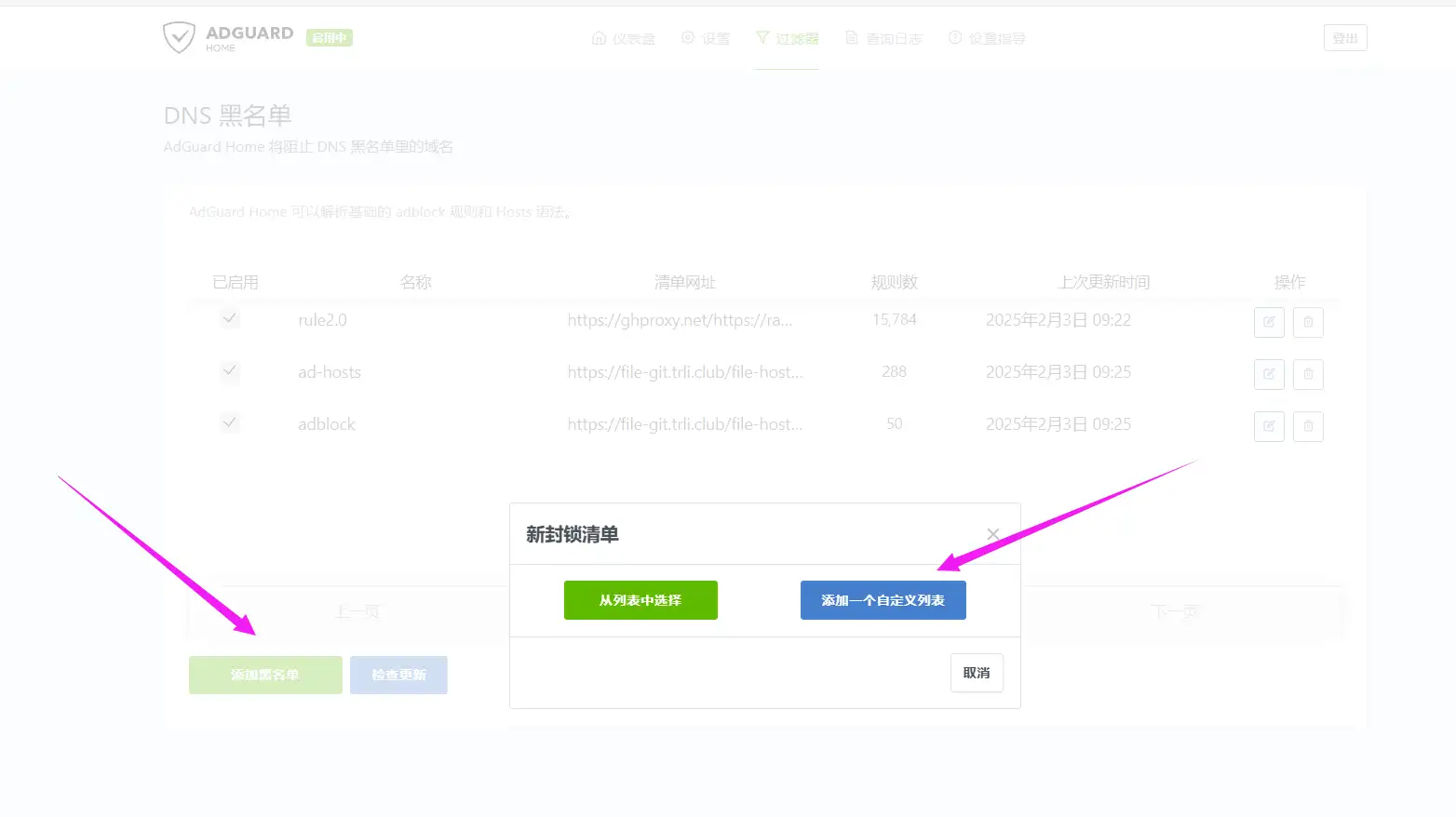
添加黑名单内容。
# 海哥https://ghfast.top/https://raw.githubusercontent.com/2771936993/HG/main/hg1.txt# hostshttps://file-git.trli.club/file-hosts/ad-hosts/hosts# adblockhttps://file-git.trli.club/file-hosts/ad-hosts/adblock4.5 白名单设置
添加白名单内容。
# Domainshttps://file-git.trli.club/file-hosts/allow/Domains# adblockhttps://file-git.trli.club/file-hosts/allow/adblock5 怎么使用 Adguard Home 的 dns
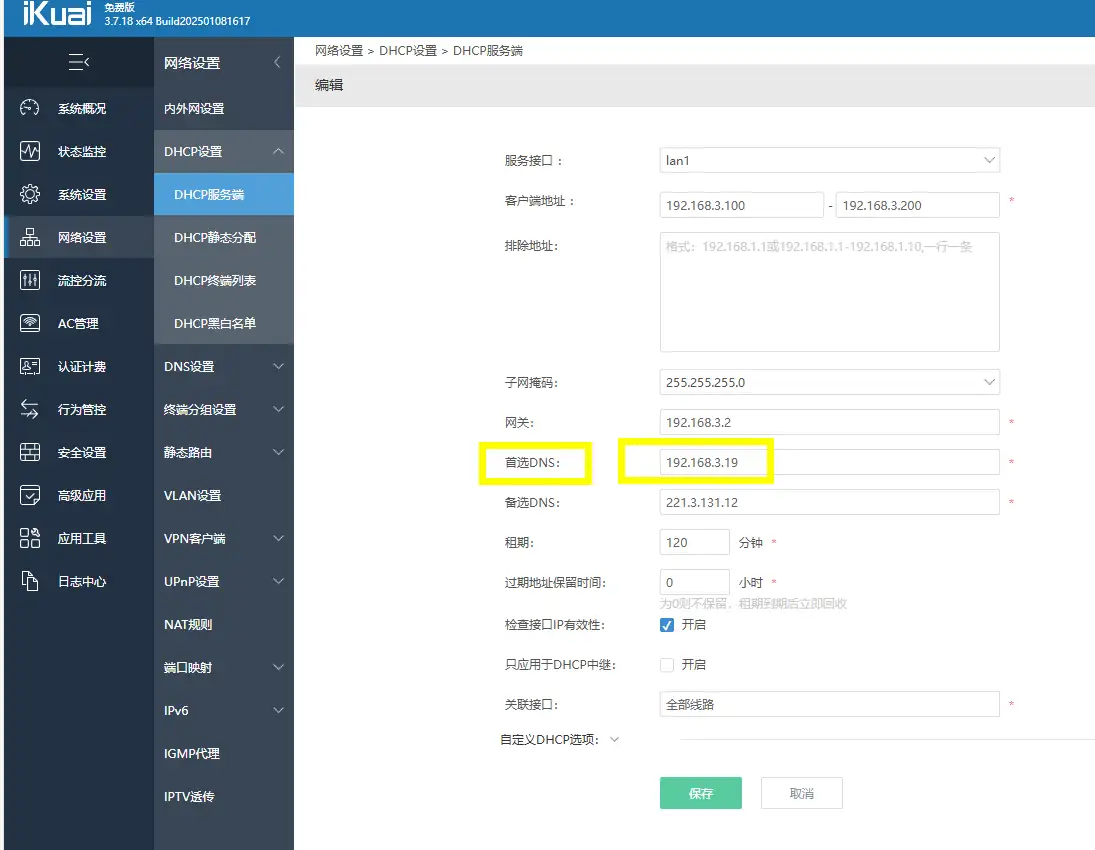
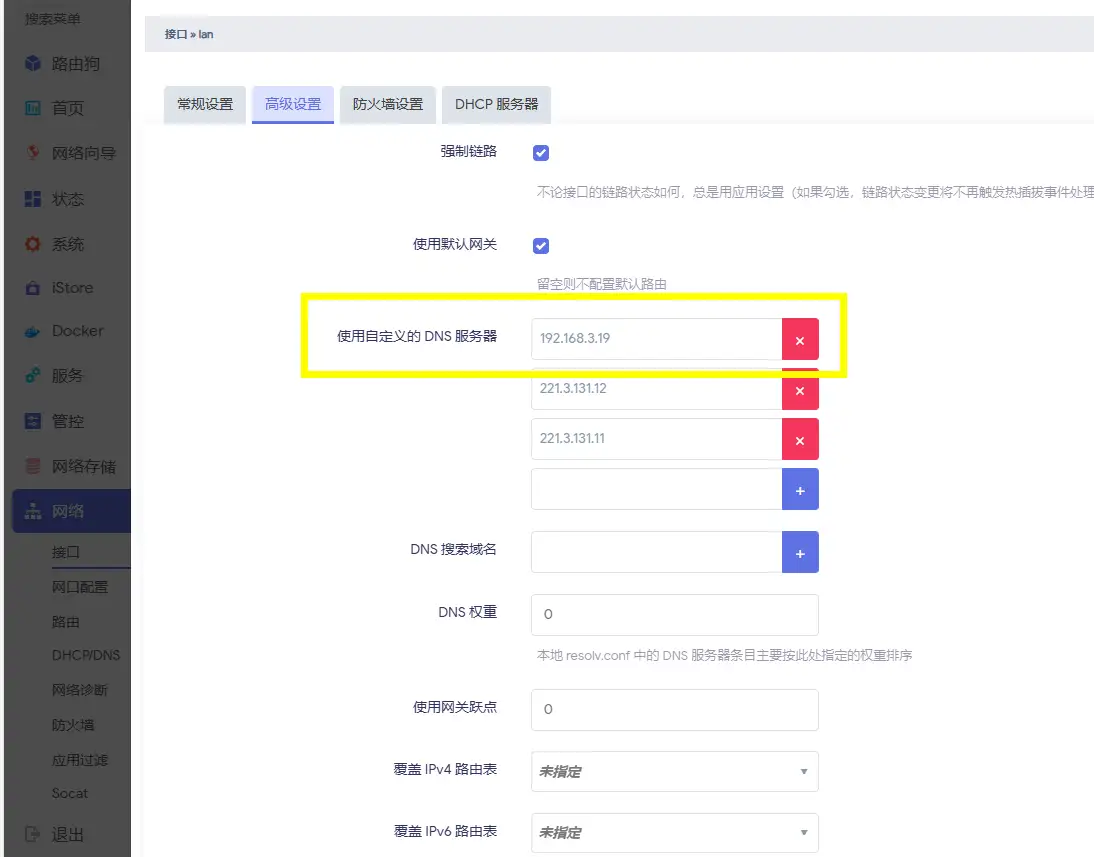
使用很简单,因为是独立 IP,直接在主路由中设置 adg 的 ip 为 dns 就可以了。
我这里以爱快和openwrt为例子,如图所示。
6 Adguard Home 的配置文件(直接暴力管饭)
首先只需要上传上游分流规则文件。
其次把里面的加密登陆账号和密码改成你安装时候设置的,这个账号和加密的密码是你注册 adg 时候给的的在你本来的那个 yaml 文件里面找。
最后只需要改一下运营商 dns 就可以。
http: pprof: port: 6060 enabled: false address: 0.0.0.0:80 session_ttl: 720husers: # 登录账号,开始注册的。 - name: #登录密码,密码是加密的。 password:auth_attempts: 5block_auth_min: 15http_proxy: ""language: ""theme: autodns: bind_hosts: - 0.0.0.0 port: 53 anonymize_client_ip: false ratelimit: 20 ratelimit_subnet_len_ipv4: 24 ratelimit_subnet_len_ipv6: 56 ratelimit_whitelist: [] refuse_any: true upstream_dns: - https://dns.alidns.com/dns-query - https://223.5.5.5/dns-query # 修改上游分流规则文件路径 upstream_dns_file: /opt/adguardhome/rule/dns-2.0.txt bootstrap_dns: # 修改运营商dns,也可以用大厂的dns比如腾讯、阿里 # 这里需要改成你运营商的dns最好 - 221.3.131.11 - 221.3.131.12 fallback_dns: [] upstream_mode: parallel fastest_timeout: 1s allowed_clients: [] disallowed_clients: [] blocked_hosts: - version.bind - id.server - hostname.bind trusted_proxies: - 127.0.0.0/8 - ::1/128 cache_size: 4194304 cache_ttl_min: 60 cache_ttl_max: 600 cache_optimistic: true bogus_nxdomain: [] aaaa_disabled: false enable_dnssec: true edns_client_subnet: custom_ip: "" enabled: true use_custom: false max_goroutines: 300 handle_ddr: true ipset: [] ipset_file: "" bootstrap_prefer_ipv6: false upstream_timeout: 10s private_networks: [] use_private_ptr_resolvers: false local_ptr_upstreams: [] use_dns64: false dns64_prefixes: [] serve_http3: false use_http3_upstreams: false serve_plain_dns: true hostsfile_enabled: truetls: enabled: false server_name: "" force_https: false port_https: 443 port_dns_over_tls: 853 port_dns_over_quic: 853 port_dnscrypt: 0 dnscrypt_config_file: "" allow_unencrypted_doh: false certificate_chain: "" private_key: "" certificate_path: "" private_key_path: "" strict_sni_check: falsequerylog: dir_path: "" ignored: [] interval: 2160h size_memory: 1000 enabled: true file_enabled: truestatistics: dir_path: "" ignored: [] interval: 24h enabled: truefilters: #黑名单规则 - enabled: true url: https://ghproxy.net/https://raw.githubusercontent.com/qq5460168/666/master/rules.txt name: rule2.0 id: 1737124284 - enabled: true url: https://file-git.trli.club/file-hosts/ad-hosts/hosts name: ad-hosts id: 1738545601 - enabled: true url: https://file-git.trli.club/file-hosts/ad-hosts/adblock name: adblock id: 1738545602whitelist_filters: #白名单规则 - enabled: true url: https://file-git.trli.club/file-hosts/allow/Domains name: Domains id: 1738545604 - enabled: true url: https://file-git.trli.club/file-hosts/allow/adblock name: adblock id: 1738545605user_rules: []dhcp: enabled: false interface_name: "" local_domain_name: lan dhcpv4: gateway_ip: "" subnet_mask: "" range_start: "" range_end: "" lease_duration: 86400 icmp_timeout_msec: 1000 options: [] dhcpv6: range_start: "" lease_duration: 86400 ra_slaac_only: false ra_allow_slaac: falsefiltering: blocking_ipv4: "" blocking_ipv6: "" blocked_services: schedule: time_zone: UTC ids: [] protection_disabled_until: null safe_search: enabled: false bing: true duckduckgo: true ecosia: true google: true pixabay: true yandex: true youtube: true blocking_mode: default parental_block_host: family-block.dns.adguard.com safebrowsing_block_host: standard-block.dns.adguard.com rewrites: [] safe_fs_patterns: - /opt/adguardhome/work/userfilters/* safebrowsing_cache_size: 1048576 safesearch_cache_size: 1048576 parental_cache_size: 1048576 cache_time: 30 filters_update_interval: 24 blocked_response_ttl: 10 filtering_enabled: true parental_enabled: false safebrowsing_enabled: false protection_enabled: trueclients: runtime_sources: whois: true arp: true rdns: true dhcp: true hosts: true persistent: []log: enabled: true file: "" max_backups: 0 max_size: 100 max_age: 3 compress: false local_time: false verbose: falseos: group: "" user: "" rlimit_nofile: 0schema_version: 29部分信息可能已经过时